<!DOCTYPE html>
	<html lang="vi" xmlns="http://www.w3.org/1999/xhtml" prefix="og: http://ogp.me/ns#">
	<head>
<title>Hướng dẫn cách tạo tài khoản Gmail và cách đổi tên hiển thị của Gmail - Trường Tiểu học Nguyễn Trãi</title>
<meta name="description" content="Hướng dẫn cách tạo tài khoản Gmail và cách đổi tên hiển thị của Gmail - Savefile - Tin tức -...">
<meta name="author" content="Trường Tiểu học Nguyễn Trãi">
<meta name="copyright" content="Trường Tiểu học Nguyễn Trãi [webmaster@vinades.vn]">
<meta name="generator" content="NukeViet v4.5">
<meta name="viewport" content="width=device-width, initial-scale=1">
<meta http-equiv="Content-Type" content="text/html; charset=utf-8">
<meta property="og:title" content="Hướng dẫn cách tạo tài khoản Gmail và cách đổi tên hiển thị của Gmail">
<meta property="og:type" content="website">
<meta property="og:description" content="Savefile - Tin tức -...">
<meta property="og:site_name" content="Trường Tiểu học Nguyễn Trãi">
<meta property="og:url" content="https://thnguyentrai.phuongthudaumot.edu.vn/savefile/hoat-dong-chuyen-mon/huong-dan-cach-tao-tai-khoan-gmail-va-cach-doi-ten-hien-thi-cua-gmail-754.html">
<link rel="shortcut icon" href="https://thnguyentrai.phuongthudaumot.edu.vn/uploads/thnguyentrai/banner_text_tieuhoc_avinhphutayedu08.png">
<link rel="canonical" href="https://thnguyentrai.phuongthudaumot.edu.vn/savefile/hoat-dong-chuyen-mon/huong-dan-cach-tao-tai-khoan-gmail-va-cach-doi-ten-hien-thi-cua-gmail-754.html">
<link rel="alternate" href="https://thnguyentrai.phuongthudaumot.edu.vn/rss/" title="Tin tức" type="application/rss+xml">
<link rel="alternate" href="https://thnguyentrai.phuongthudaumot.edu.vn/rss/Thong-bao/" title="Tin tức - Thông báo" type="application/rss+xml">
<link rel="alternate" href="https://thnguyentrai.phuongthudaumot.edu.vn/rss/Tuyen-sinh/" title="Tin tức - Tuyển sinh" type="application/rss+xml">
<link rel="alternate" href="https://thnguyentrai.phuongthudaumot.edu.vn/rss/Tieu-bieu/" title="Tin tức - Tiêu biểu" type="application/rss+xml">
<link rel="alternate" href="https://thnguyentrai.phuongthudaumot.edu.vn/rss/hoat-dong-chuyen-mon/" title="Tin tức - Hoạt động chuyên môn" type="application/rss+xml">
<link rel="alternate" href="https://thnguyentrai.phuongthudaumot.edu.vn/rss/hoat-dong-doan-the/" title="Tin tức - Hoạt động Đoàn - Đội" type="application/rss+xml">
<link rel="alternate" href="https://thnguyentrai.phuongthudaumot.edu.vn/rss/y-te-hoc-duong/" title="Tin tức - Y tế học đường" type="application/rss+xml">
<link rel="alternate" href="https://thnguyentrai.phuongthudaumot.edu.vn/rss/thu-vien/" title="Tin tức - Thư viện" type="application/rss+xml">
<link rel="alternate" href="https://thnguyentrai.phuongthudaumot.edu.vn/rss/ban-tru/" title="Tin tức - Bán trú" type="application/rss+xml">
<link rel="alternate" href="https://thnguyentrai.phuongthudaumot.edu.vn/rss/gioi-thieu-csvc-ban-tru/" title="Tin tức - Giới thiệu csvc bán trú" type="application/rss+xml">
<link rel="alternate" href="https://thnguyentrai.phuongthudaumot.edu.vn/rss/thuc-don/" title="Tin tức - Thực đơn" type="application/rss+xml">
<link rel="alternate" href="https://thnguyentrai.phuongthudaumot.edu.vn/rss/suc-khoe-va-dinh-duong/" title="Tin tức - Sức khỏe và dinh dưỡng" type="application/rss+xml">
<link rel="alternate" href="https://thnguyentrai.phuongthudaumot.edu.vn/rss/thong-ke/" title="Tin tức - Thống kê" type="application/rss+xml">
<link rel="alternate" href="https://thnguyentrai.phuongthudaumot.edu.vn/rss/chuyen-doi-so/" title="Tin tức - Chuyển đổi số" type="application/rss+xml">
<link rel="alternate" href="https://thnguyentrai.phuongthudaumot.edu.vn/rss/cai-cach-hanh-chinh/" title="Tin tức - Cải cách hành chính" type="application/rss+xml">
<link rel="preload" as="style" href="https://thnguyentrai.phuongthudaumot.edu.vn/assets/css/font-awesome.min.css" type="text/css">
<link rel="preload" as="style" href="https://thnguyentrai.phuongthudaumot.edu.vn/themes/edu36th/css/bootstrap.min.css" type="text/css">
<link rel="preload" as="style" href="https://thnguyentrai.phuongthudaumot.edu.vn/themes/edu36th/css/style.css" type="text/css">
<link rel="preload" as="style" href="https://thnguyentrai.phuongthudaumot.edu.vn/themes/edu36th/css/style.responsive.css" type="text/css">
<link rel="preload" as="style" href="https://thnguyentrai.phuongthudaumot.edu.vn/themes/edu36th/css/style-red.css" type="text/css">
<link rel="preload" as="style" href="https://thnguyentrai.phuongthudaumot.edu.vn/themes/edu36th/css/news.css" type="text/css">
<link rel="preload" as="style" href="https://thnguyentrai.phuongthudaumot.edu.vn/themes/edu36th/css/custom.css" type="text/css">
<link rel="preload" as="script" href="https://thnguyentrai.phuongthudaumot.edu.vn/assets/js/jquery/jquery.min.js" type="text/javascript">
<link rel="preload" as="script" href="https://thnguyentrai.phuongthudaumot.edu.vn/assets/js/language/vi.js" type="text/javascript">
<link rel="preload" as="script" href="https://thnguyentrai.phuongthudaumot.edu.vn/assets/js/DOMPurify/purify3.js" type="text/javascript">
<link rel="preload" as="script" href="https://thnguyentrai.phuongthudaumot.edu.vn/assets/js/global.js" type="text/javascript">
<link rel="preload" as="script" href="https://thnguyentrai.phuongthudaumot.edu.vn/assets/js/site.js" type="text/javascript">
<link rel="preload" as="script" href="https://thnguyentrai.phuongthudaumot.edu.vn/themes/edu36th/js/news.js" type="text/javascript">
<link rel="preload" as="script" href="https://thnguyentrai.phuongthudaumot.edu.vn/themes/edu36th/js/main.js" type="text/javascript">
<link rel="preload" as="script" href="https://thnguyentrai.phuongthudaumot.edu.vn/themes/edu36th/js/custom.js" type="text/javascript">
<link rel="preload" as="script" href="https://thnguyentrai.phuongthudaumot.edu.vn/themes/edu36th/js/bootstrap.min.js" type="text/javascript">
<link rel="StyleSheet" href="https://thnguyentrai.phuongthudaumot.edu.vn/assets/css/font-awesome.min.css">
<link rel="StyleSheet" href="https://thnguyentrai.phuongthudaumot.edu.vn/themes/edu36th/css/bootstrap.min.css">
<link rel="StyleSheet" href="https://thnguyentrai.phuongthudaumot.edu.vn/themes/edu36th/css/style.css">
<link rel="StyleSheet" href="https://thnguyentrai.phuongthudaumot.edu.vn/themes/edu36th/css/style.responsive.css">
<link rel="StyleSheet" href="https://thnguyentrai.phuongthudaumot.edu.vn/themes/edu36th/css/style-red.css">
<link rel="StyleSheet" href="https://thnguyentrai.phuongthudaumot.edu.vn/themes/edu36th/css/news.css">
<link rel="StyleSheet" href="https://thnguyentrai.phuongthudaumot.edu.vn/themes/edu36th/css/custom.css">
<style type="text/css">
	body{background: #fff;}
</style>
	</head>
	<body>
<div id="print">
	<div id="hd_print">
		<h2 class="pull-left">Trường Tiểu học Nguyễn Trãi</h2>
		<p class="pull-right"><a title="Trường Tiểu học Nguyễn Trãi" href="https://thnguyentrai.phuongthudaumot.edu.vn/">https://thnguyentrai.phuongthudaumot.edu.vn</a></p>
	</div>
	<div class="clear"></div>
	<hr />
	<div id="content">
		<h1>Hướng dẫn cách tạo tài khoản Gmail và cách đổi tên hiển thị của Gmail</h1>
		<ul class="list-inline">
			<li>Thứ hai - 13/09/2021 13:07</li>
			<li class="hidden-print txtrequired"><em class="fa fa-print">&nbsp;</em><a title="In ra" href="javascript:;" onclick="window.print()">In ra</a></li>
			<li class="hidden-print txtrequired"><em class="fa fa-power-off">&nbsp;</em><a title="Đóng cửa sổ này" href="javascript:;" onclick="window.close()">Đóng cửa sổ này</a></li>
		</ul>
		<div class="clear"></div>
		<div id="hometext">
						<div class="pull-left imghome">
				<img alt="Hướng dẫn cách tạo tài khoản Gmail và cách đổi tên hiển thị của Gmail" src="https://thnguyentrai.phuongthudaumot.edu.vn/assets/thnguyentrai/tin-tuc/2021_09/gmail-2.jpg" width="110" class="img-thumbnail" />
			</div>
			Gmail là dịch vụ email miễn phí của Google. Bạn có thể đăng ký, tạo tài khoản Gmail tại địa chỉ mail.google.com.
		</div>
		<div id="bodytext" class="clearfix">
			<span style="font-size:16px;">&nbsp; &nbsp; &nbsp; Có quá nhiều việc cần phải dùng đến tài khoản Gmail.Như gửi và nhận email dễ dàng, nhanh chóng và đặc biệt là miễn phí (free). Ngoài ra có thể Đăng nhập, sử dụng và đồng bộ với tất cả các dịch vụ của Google như phục vụ cho cuộc họp trên Google Meet.</span><br />
&nbsp;
<div style="text-align: center;"><span style="font-size:16px;"><strong>Hướng dẫn cách đăng ký Gmail, Tạo tài khoản Gmail</strong></span></div>
<br />
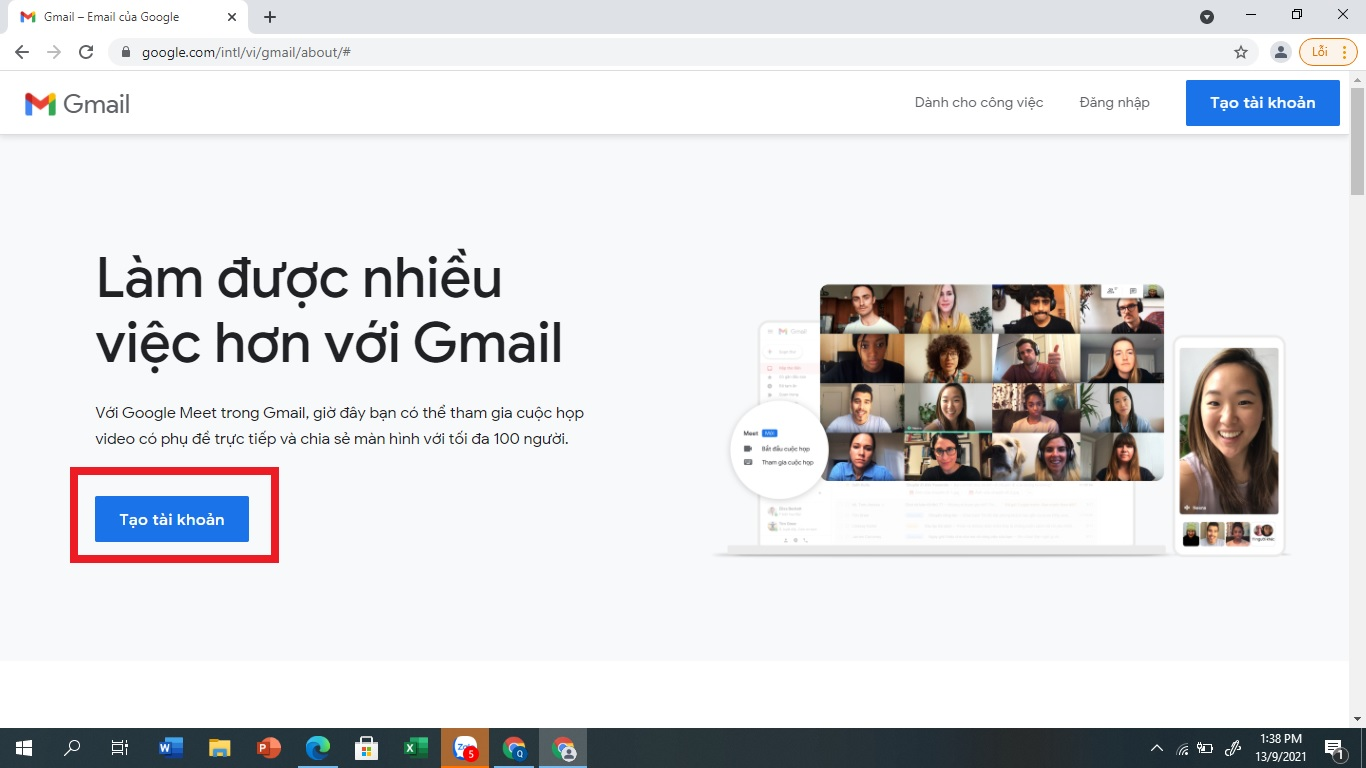
<span style="font-size:16px;"><strong>Bước 1</strong>: Để đăng ký Gmail bạn click vào nút sau:&nbsp;&nbsp;<strong><a href="https://accounts.google.com/SignUp?hl=vi">Đăng ký Gmail</a><br />
Hoặc truy cập trang web: <a href="http://mail.google.com">mail.google.com</a>&nbsp;<br />
Sau đó chọn <span style="color:rgb(192, 57, 43);">Tạo tài khoản</span></strong></span>

<div class="image-center">
<figure class="image"><img alt="" height="450" src="https://thnguyentrai.phuongthudaumot.edu.vn/uploads/thnguyentrai/news/2021_09/image_2.png" width="800" />
<figcaption></figcaption>
</figure>
</div>
<br />
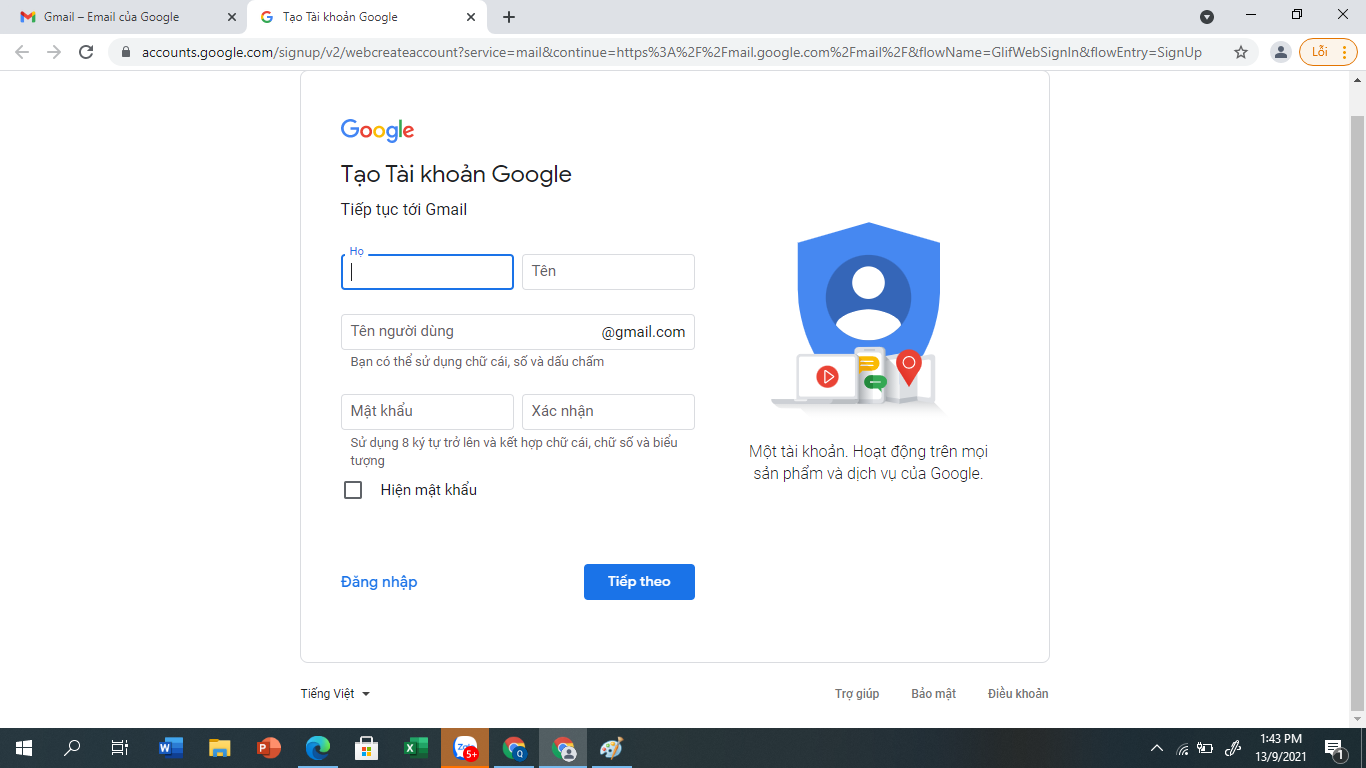
<span style="font-size:16px;"><strong>Bước 2:</strong> Giao diện trang đăng ký tài khoản Gmail hiện ra như sau:</span>

<div class="image-center">
<figure class="image"><img alt="" height="450" src="https://thnguyentrai.phuongthudaumot.edu.vn/uploads/thnguyentrai/news/2021_09/image_3.png" width="800" />
<figcaption>Chọn ngôn ngữ Tiếng Việt để đăng ký được dể dàng.</figcaption>
</figure>
</div>

<div style="text-align: justify;"><span style="font-size:16px;">Bạn điền đầy đủ thông tin như sau:<br />
-&nbsp; Nhập vào Họ và Tên của bạn. Bạn có thể đổi lại sau khi tạo tài khoản Gmail.<br />
- Chọn <strong>tên người dùng</strong> của bạn: Đây chính là địa chỉ Gmail của bạn. Bạn nhập tên nick Gmail muốn lập. Bạn có thể sử dụng chữ cái, số và dấu chấm với độ dài từ 6 đến 30 ký tự. Khi nhập địa chỉ Gmail ở đây có thể bạn sẽ gặp phải thông báo: Tên người dùng đó đã được sử dụng. Thử tên người dùng khác? tức là địa chỉ Gmail đó đã bị đăng ký rồi. Bạn có thể sử dụng tên gợi ý ở dưới hoặc nghĩ ra 1 cái tài khoản Gmail khác đến khi nào nó chấp thuận thì thôi.<br />
- Tạo mật khẩu &amp; Xác nhận mật khẩu: Mật khẩu phải có độ dài ít nhất là 8 ký tự. Bạn nên sử dụng kết hợp chữ HOA, chữ thường, số và ký tự đặc biệt để mật khẩu được bảo mật cao nhất. Bạn không nên sử dụng các mật khẩu dễ đoán như 12345678, tên bạn, tên người thân hoặc ngày sinh, số điện thoại…Ô xác nhận mật khẩu thì bạn nhập lại mật khẩu vừa nhập ở bên.</span></div>
<span style="font-size:16px;"><span style="color:rgb(192, 57, 43);">Lưu ý:</span> Sau khi tạo tên địa chỉ email và tạo thành công mật khẩu phải ghi chú lại ra giấy để lưu trữ tránh quên thông tin.&nbsp;<br />
Sau đó chọn <strong>Tiếp theo</strong></span><br />
&nbsp;
<div class="image-center">
<figure class="image"><img alt="" height="450" src="https://thnguyentrai.phuongthudaumot.edu.vn/uploads/thnguyentrai/news/2021_09/image_4.png" width="800" />
<figcaption></figcaption>
</figure>
</div>
&nbsp;

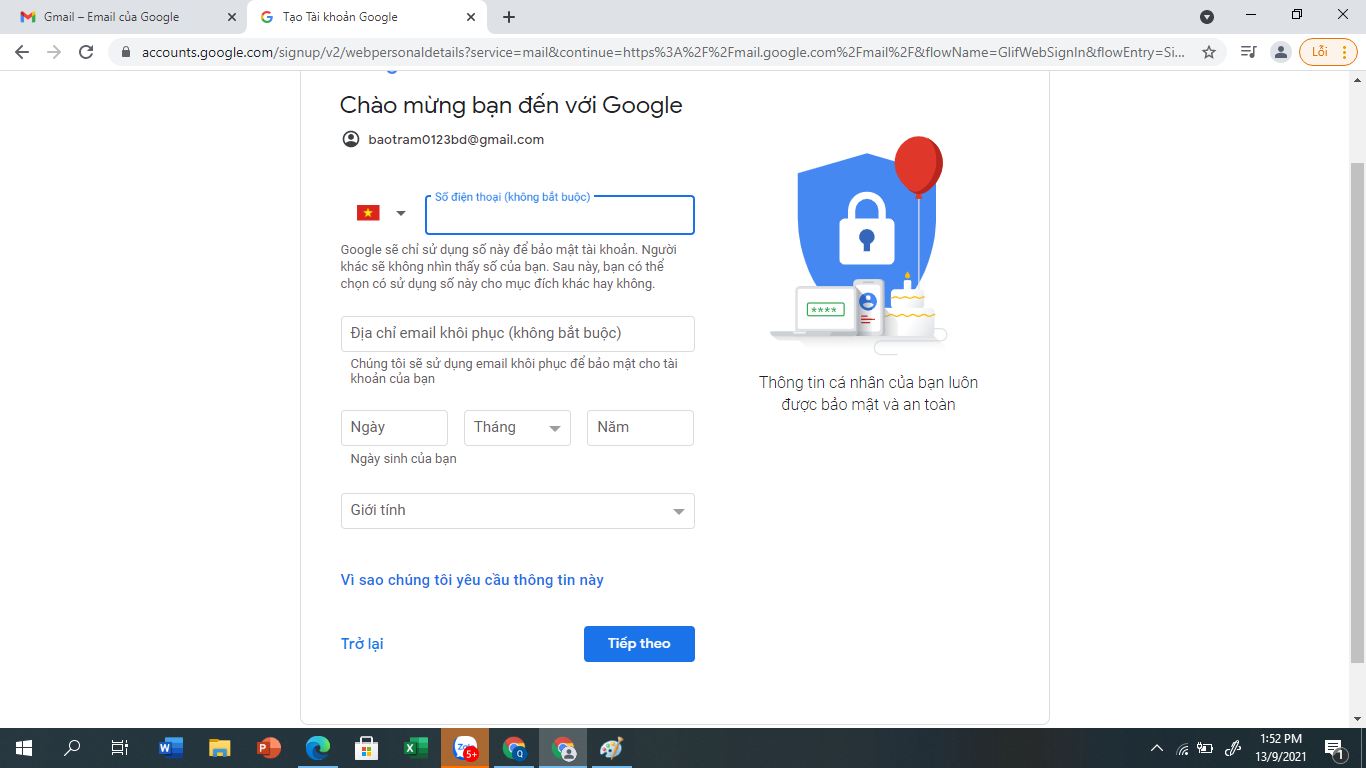
<div style="text-align: justify;"><span style="font-size:16px;">- Nhập số Điện thoại di động để kích hoạt tài khoản Gmail: Nhập số điện thoại của bạn, sau này bạn có quên mật khẩu hoặc bị ai đó lấy mất tài khoản Gmail thì có thể dễ dàng lấy lại được thông qua số điện thoại này.<br />
- Địa chỉ email khôi phục:&nbsp; Nếu bạn có một tài khoản email đang sử dụng được hãy nhập vào. Việc liên kết tài khoản email cũ của bạn với tài khoản Gmail mới này sẽ giúp bạn lấy lại mật khẩu dễ dàng khi quên hoặc mất tài khoản Gmail.<br />
- Nhập Ngày Tháng Năm sinh: Điền đầy đủ ngày tháng năm sinh của bạn vào. Theo quy định của Google, nếu tính đến thời điểm bạn tạo Gmail mà bạn chưa đủ 16 tuổi thì không được lập tài khoản Gmail. Vậy nên hãy chú ý đến phần này.</span></div>
<span style="font-size:16px;">- Giới tính: Chọn Nam hoặc Nữ<br />
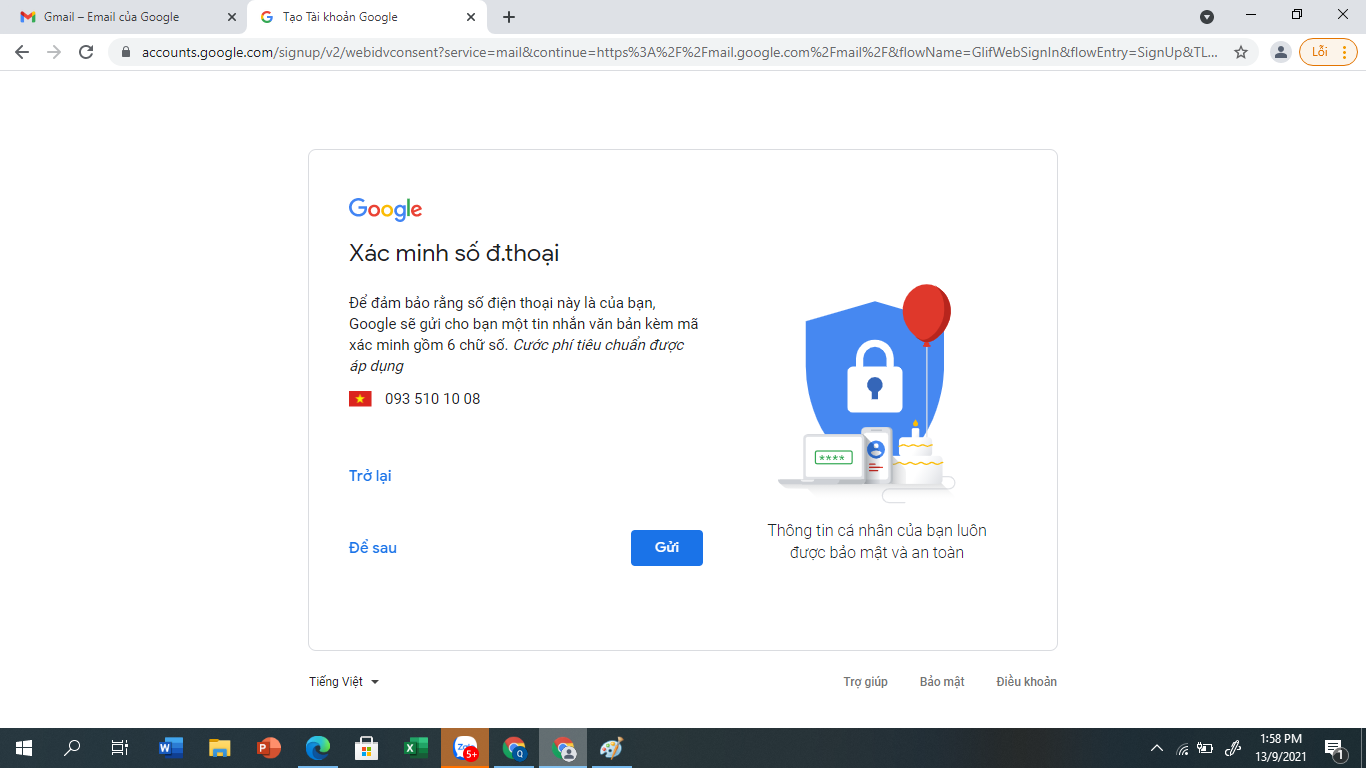
Sau đó chọn <strong>Tiếp theo<br />
Chuyển qua Xác minh số điện thoại:&nbsp; </strong>Chọn<strong> Gửi<br />
&nbsp;</strong></span>

<div class="image-center">
<figure class="image"><img alt="" height="450" src="https://thnguyentrai.phuongthudaumot.edu.vn/uploads/thnguyentrai/news/2021_09/image_5.png" width="800" />
<figcaption></figcaption>
</figure>
</div>
<br />
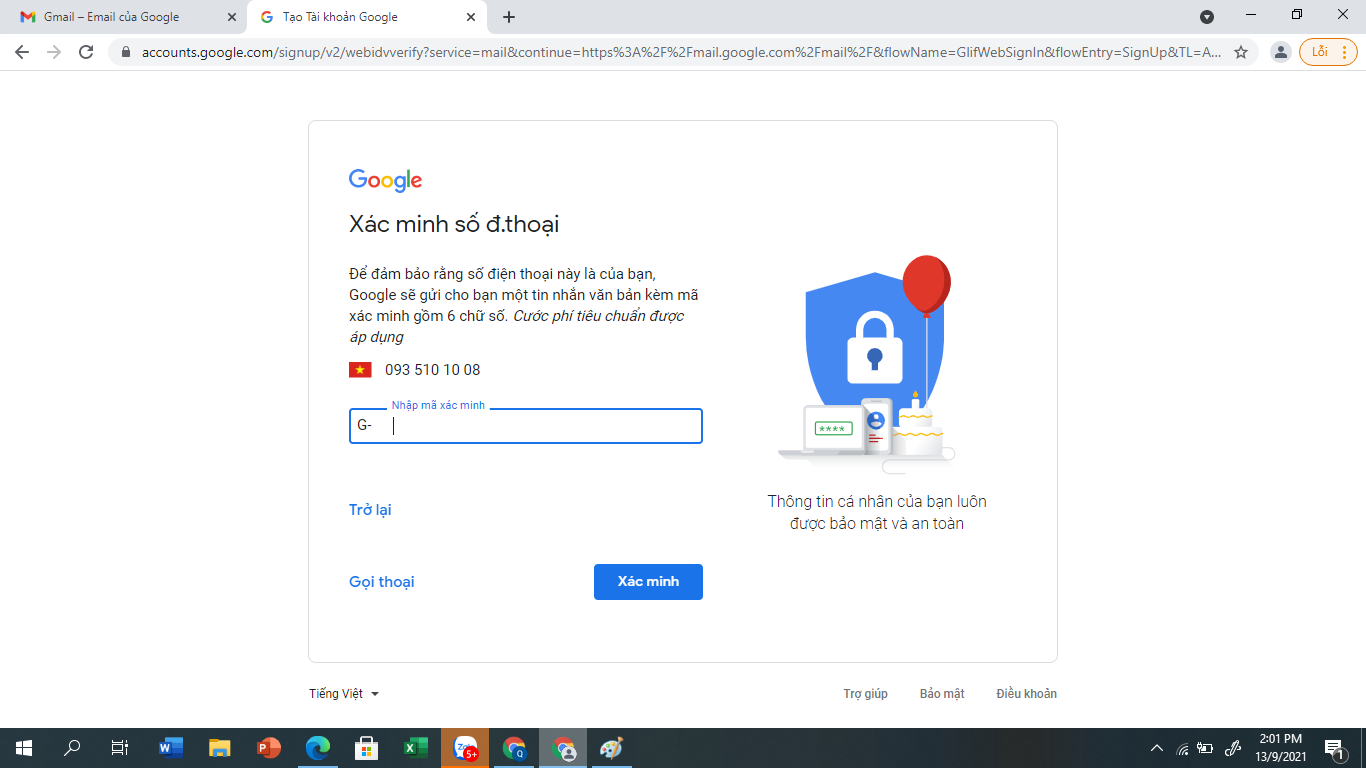
<span style="font-size:16px;">Lúc này trên số điện thoại bạn đã đăng ký sẽ có 1 tin nhắn của Google gửi mã xác nhận gồm 6 chữ số: Bạn gõ mã xác minh này vào khung bên dưới:<br />
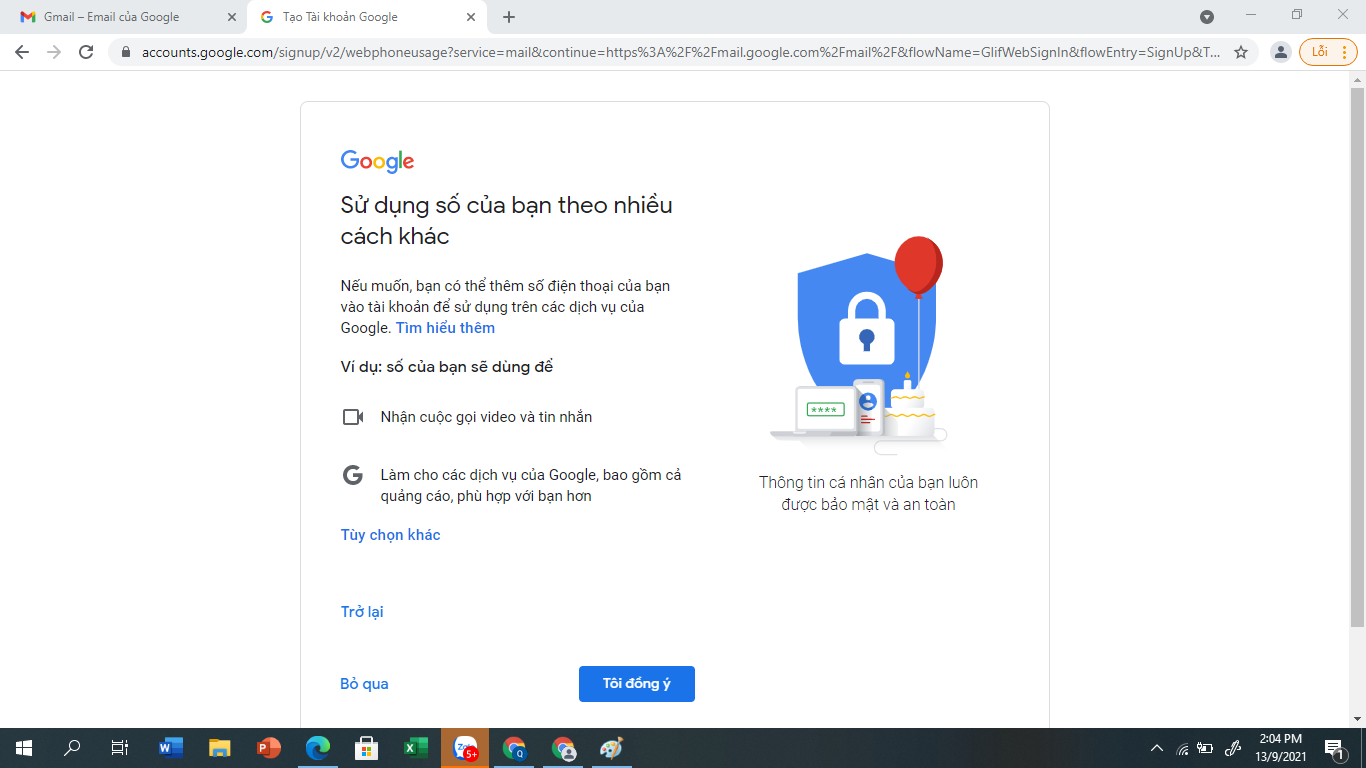
Chọn<strong> Xác minh &gt; </strong>Chọn<strong> Tôi đồng ý</strong></span>

<div dir="rtl">
<div class="image-center">
<figure class="image"><img alt="" height="450" src="https://thnguyentrai.phuongthudaumot.edu.vn/uploads/thnguyentrai/news/2021_09/image_6.png" width="800" />
<figcaption></figcaption>
</figure>
</div>
&nbsp;

<div class="image-center">
<figure class="image"><img alt="" height="450" src="https://thnguyentrai.phuongthudaumot.edu.vn/uploads/thnguyentrai/news/2021_09/image_7.png" width="800" />
<figcaption></figcaption>
</figure>
</div>
</div>
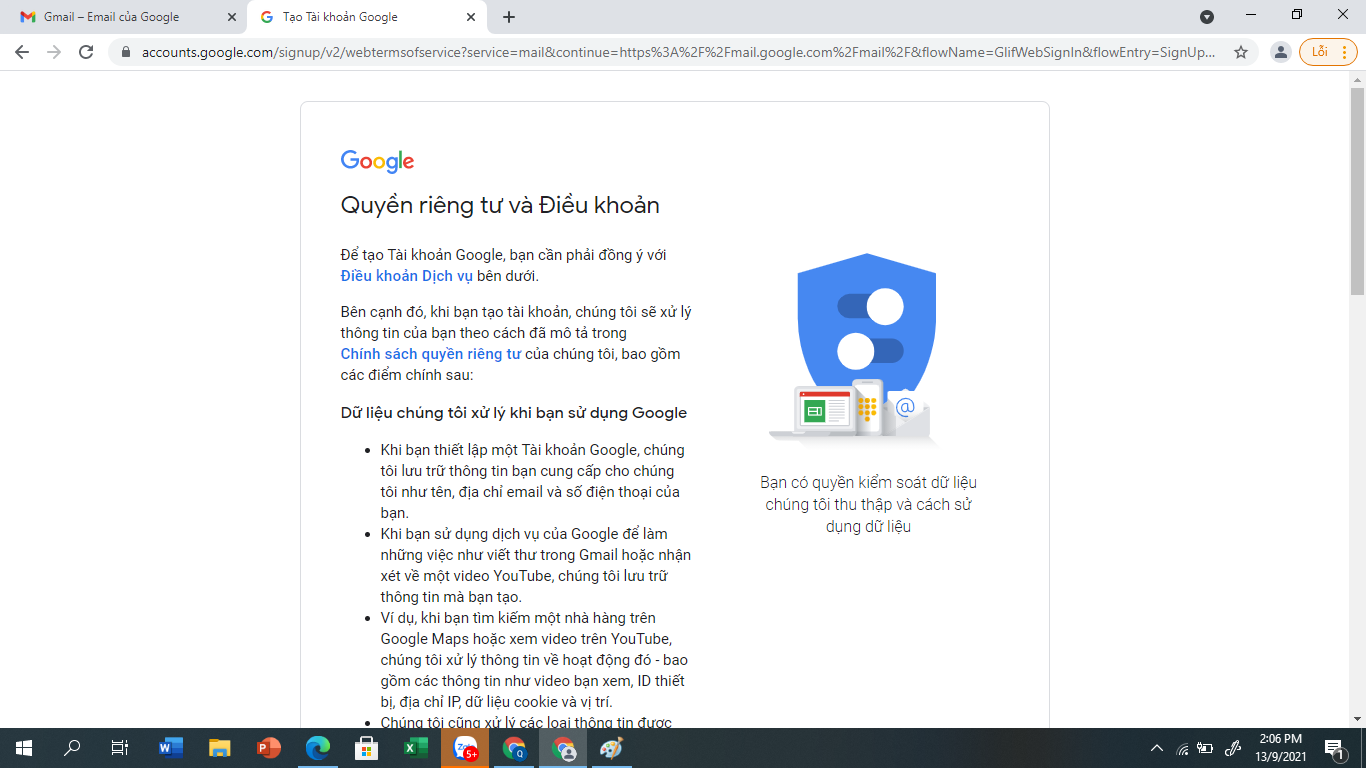
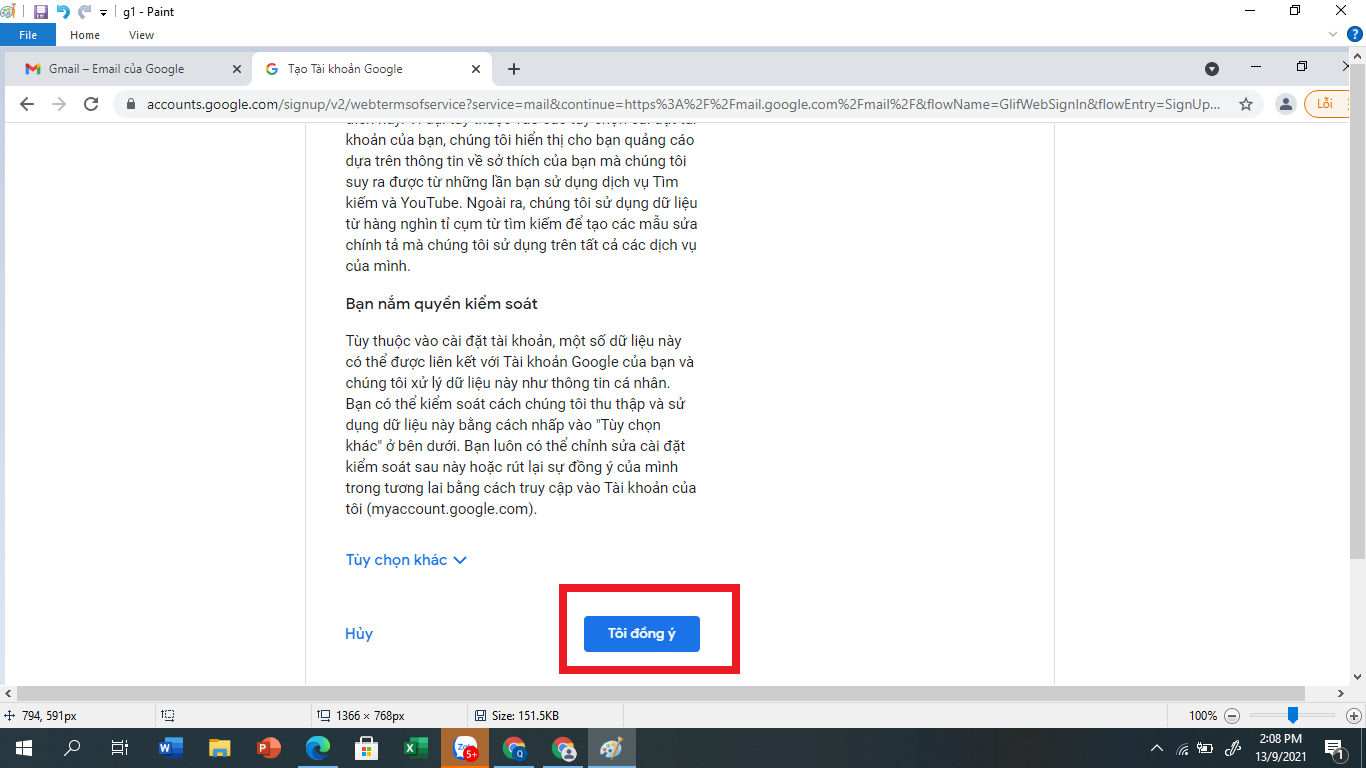
<span style="font-size:16px;">Kéo chuột chuyển đến cuối trang để đọc và tìm hiểu về <strong><em>Quyền riêng tư và tài khoản</em></strong>: Chọn <strong>Tôi đồng ý</strong></span>

<div class="image-center">
<figure class="image"><img alt="" height="450" src="https://thnguyentrai.phuongthudaumot.edu.vn/uploads/thnguyentrai/news/2021_09/image_8.png" width="800" />
<figcaption></figcaption>
</figure>
</div>

<div class="image-center">
<figure class="image"><img alt="" height="450" src="https://thnguyentrai.phuongthudaumot.edu.vn/uploads/thnguyentrai/news/2021_09/image_9.png" width="800" />
<figcaption></figcaption>
</figure>
</div>
<br />
<span style="font-size:16px;"><strong>Bước 3:</strong> Sau khi đăng ký Gmail thành công sẽ có 1 màn hình thông báo hiện ra như sau:</span>

<div class="image-center">
<figure class="image"><img alt="" height="450" src="https://thnguyentrai.phuongthudaumot.edu.vn/uploads/thnguyentrai/news/2021_09/image_10.png" width="800" />
<figcaption></figcaption>
</figure>
</div>
<br />
<span style="font-size:16px;">Vậy là từ giờ bạn đã có 1 tài khoản Gmail để sử dụng.</span><br />
&nbsp;
<div style="text-align: center;"><span style="font-size:16px;"><strong>Cách đổi tên hiển thị của tài khoản Gmail: Phục vụ cho điểm danh trong Google Meet của các em học sinh.</strong></span></div>
<br />
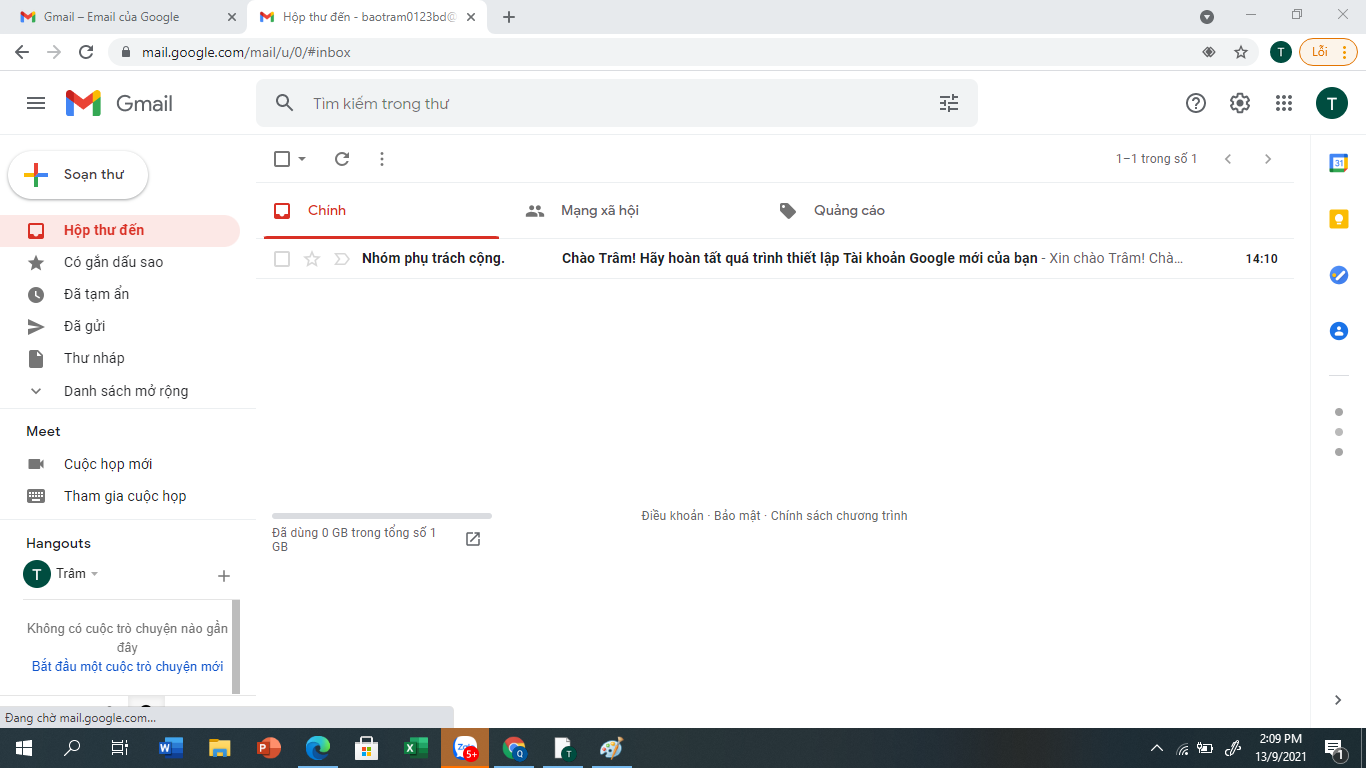
<span style="font-size:16px;">&nbsp; &nbsp; &nbsp; &nbsp;&nbsp;Trường hợp bạn tạo tài khoản Gmail với tên hiển thị là tên của mình nhưng muốn cho con em mình mượn để sử dụng học tập mà không muốn tạo một tài khoản Gmail mới.<br />
<br />
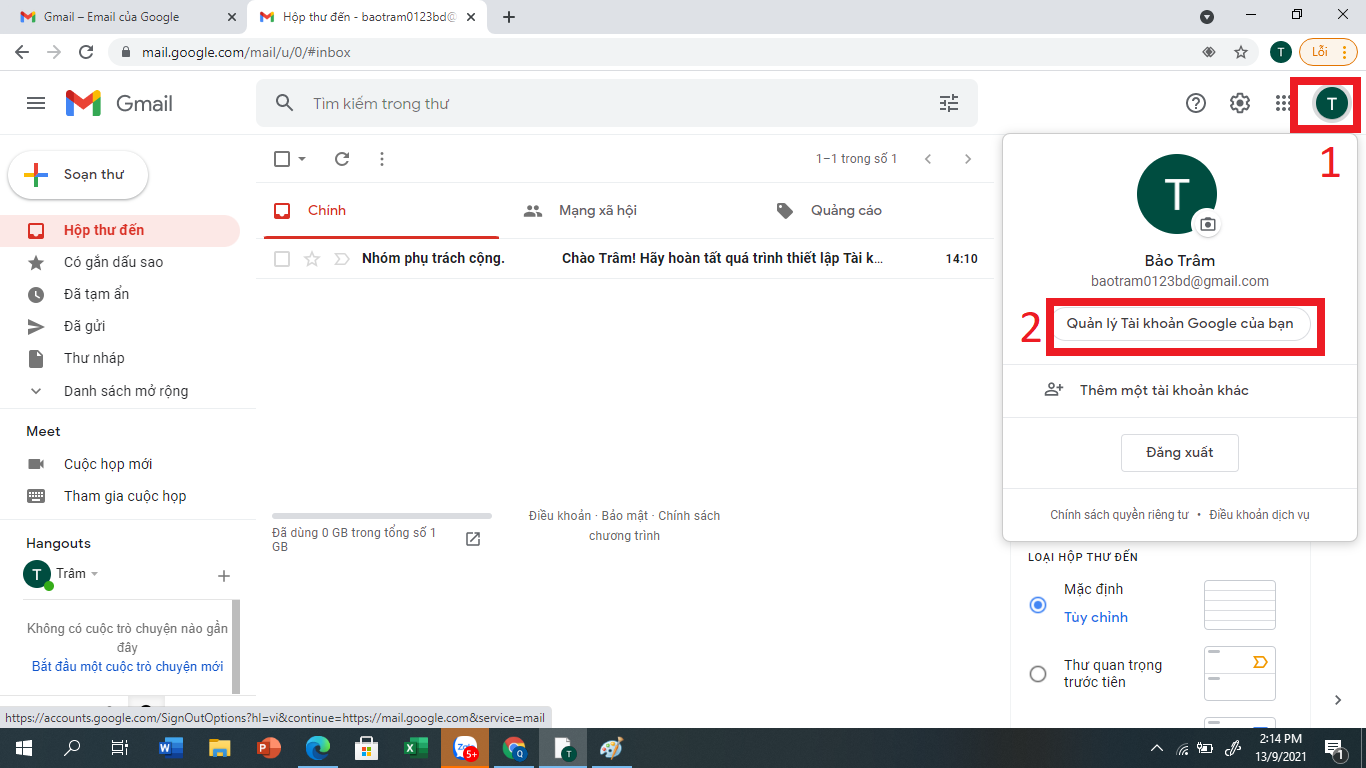
Cách thực hiện: Truy cập vào Gmail. Chọn bước 1 và 2 theo hình sau</span>

<div class="image-center">
<figure class="image"><img alt="" height="450" src="https://thnguyentrai.phuongthudaumot.edu.vn/uploads/thnguyentrai/news/2021_09/image_12.png" width="800" />
<figcaption></figcaption>
</figure>
</div>
<br />
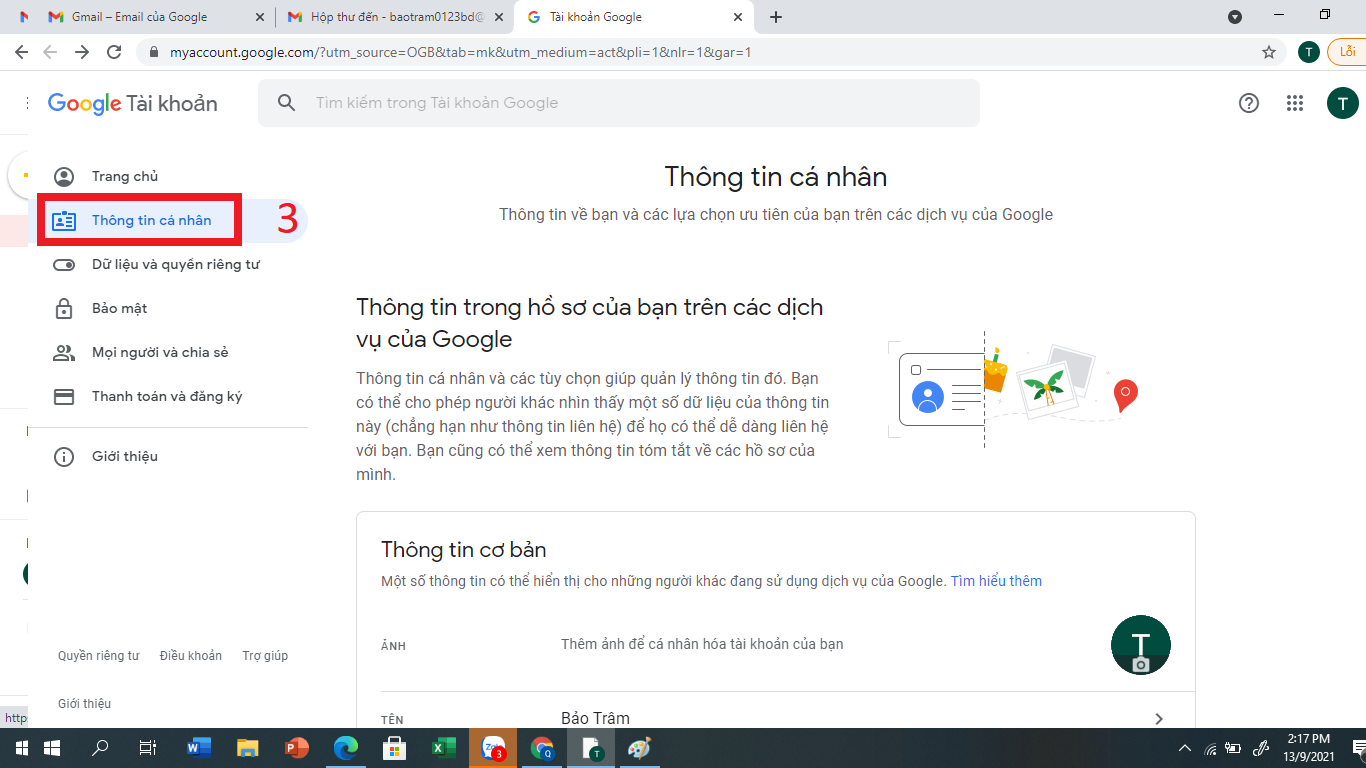
<span style="font-size:16px;">Chọn menu <strong>Thông tin cá nhân</strong></span><br />
&nbsp;
<div class="image-center">
<figure class="image"><img alt="" height="450" src="https://thnguyentrai.phuongthudaumot.edu.vn/uploads/thnguyentrai/news/2021_09/image_13.png" width="800" />
<figcaption></figcaption>
</figure>
</div>
<br />
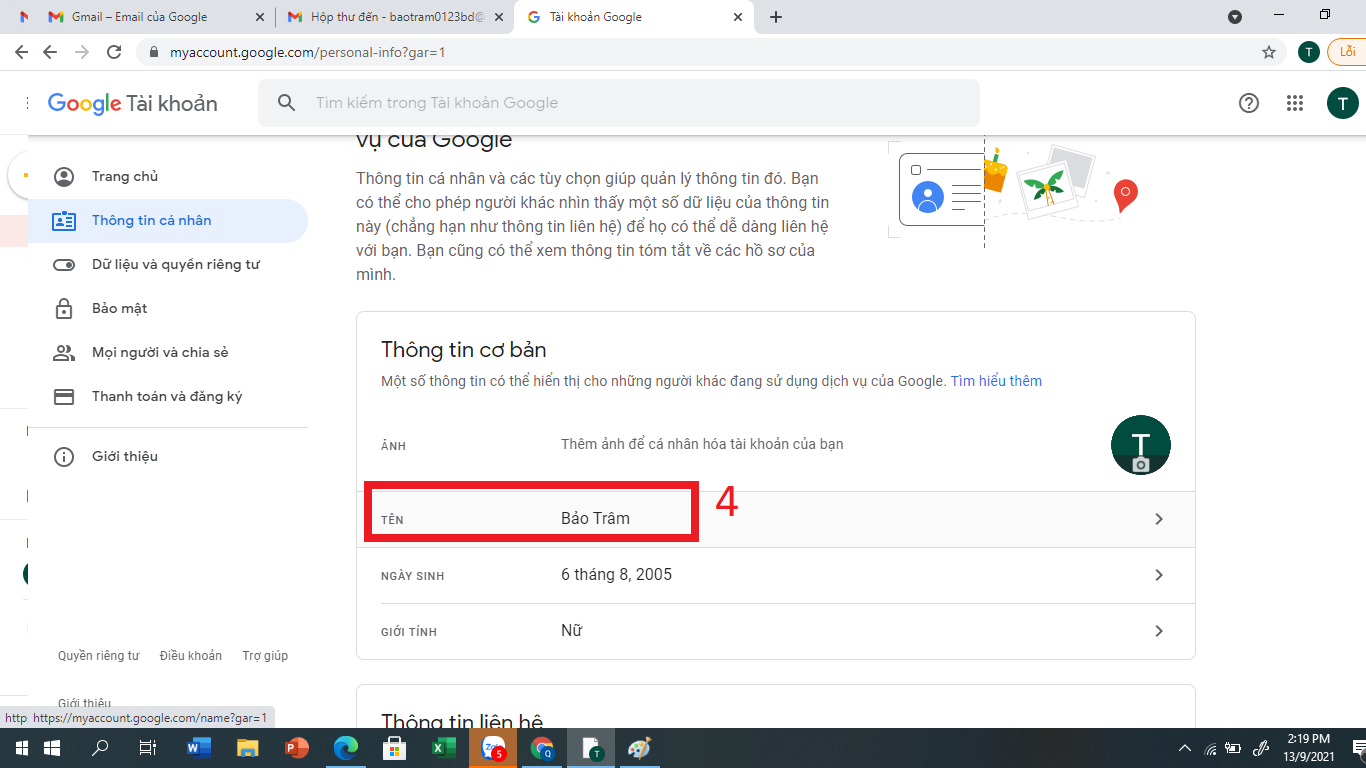
<span style="font-size:16px;">Nhấp chuột vào ô <strong>Tên</strong> để thay đổi tên mới</span>

<div class="image-center">
<figure class="image"><img alt="" height="450" src="https://thnguyentrai.phuongthudaumot.edu.vn/uploads/thnguyentrai/news/2021_09/image_14.png" width="800" />
<figcaption></figcaption>
</figure>
</div>
<br />
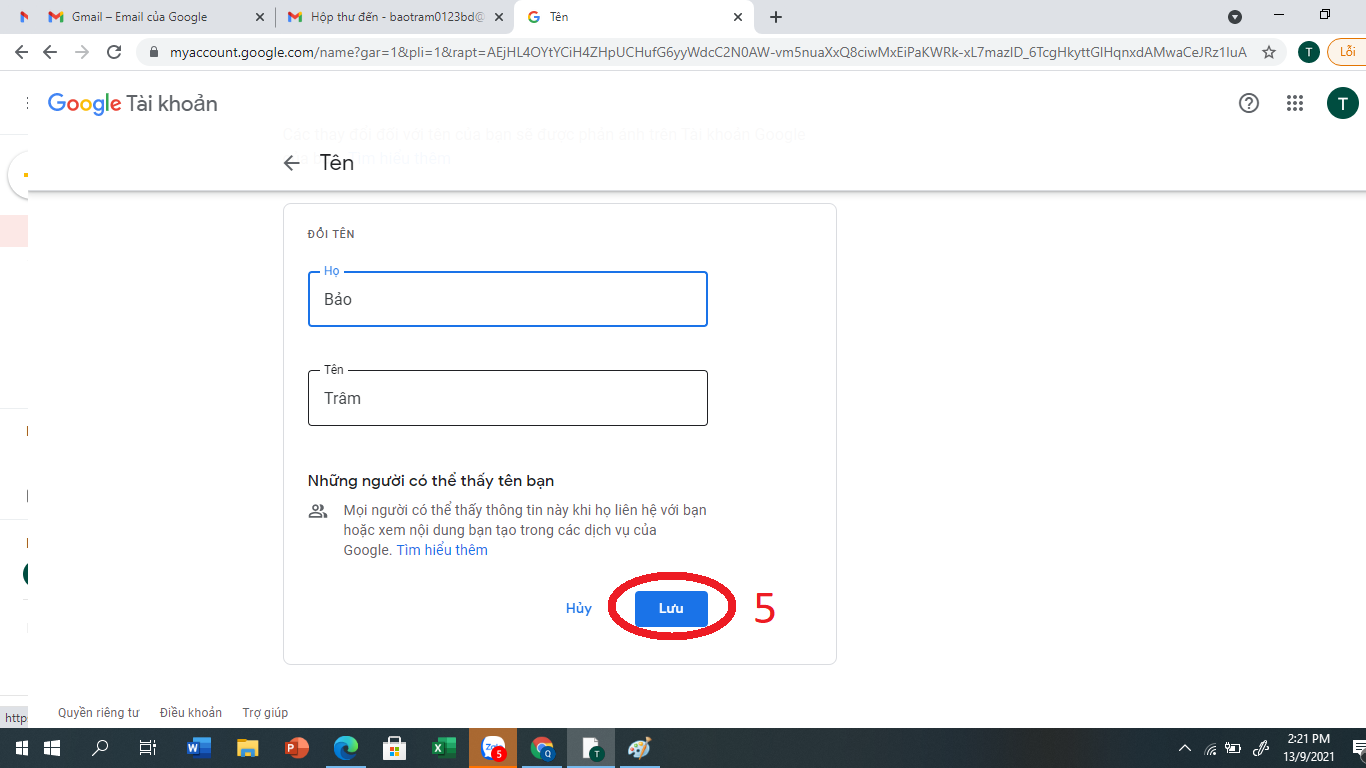
<span style="font-size:16px;">Gõ Họ - tên mới và chọn <strong>Lưu</strong></span>

<div class="image-center">
<figure class="image"><img alt="" height="450" src="https://thnguyentrai.phuongthudaumot.edu.vn/uploads/thnguyentrai/news/2021_09/image_16.png" width="800" />
<figcaption></figcaption>
</figure>
</div>
		</div>
				<div id="author">
						<p>
				<strong>Tác giả:</strong>
				Bảo Hoàng Quyên
			</p>
		</div>
				<div class="copyright">
		</div>
	</div>
	<div id="footer" class="clearfix">
		<div id="url">
			<strong>URL của bản tin này: </strong><a href="https://thnguyentrai.phuongthudaumot.edu.vn/savefile/hoat-dong-chuyen-mon/huong-dan-cach-tao-tai-khoan-gmail-va-cach-doi-ten-hien-thi-cua-gmail-754.html" title="Hướng dẫn cách tạo tài khoản Gmail và cách đổi tên hiển thị của Gmail">https://thnguyentrai.phuongthudaumot.edu.vn/savefile/hoat-dong-chuyen-mon/huong-dan-cach-tao-tai-khoan-gmail-va-cach-doi-ten-hien-thi-cua-gmail-754.html</a>

		</div>
		<div class="clear"></div>
		<div class="copyright">
			&copy; Trường Tiểu học Nguyễn Trãi
		</div>
		<div id="contact">
			<a href="mailto:webmaster@vinades.vn">webmaster@vinades.vn</a>
		</div>
	</div>
</div>
        <div id="timeoutsess" class="chromeframe">
            Bạn đã không sử dụng Site, <a onclick="timeoutsesscancel();" href="https://thnguyentrai.phuongthudaumot.edu.vn/#">Bấm vào đây để duy trì trạng thái đăng nhập</a>. Thời gian chờ: <span id="secField"> 60 </span> giây
        </div>
        <div id="openidResult" class="nv-alert" style="display:none"></div>
        <div id="openidBt" data-result="" data-redirect=""></div>
<div id="run_cronjobs" style="visibility:hidden;display:none;"><img alt="cron" src="/index.php?second=cronjobs&amp;p=d11vh83V" width="1" height="1" /></div>
<script src="https://thnguyentrai.phuongthudaumot.edu.vn/assets/js/jquery/jquery.min.js"></script>
<script>var nv_base_siteurl="/",nv_lang_data="vi",nv_lang_interface="vi",nv_name_variable="nv",nv_fc_variable="op",nv_lang_variable="language",nv_module_name="tin-tuc",nv_func_name="savefile",nv_is_user=0, nv_my_ofs=7,nv_my_abbr="+07",nv_cookie_prefix="nv4c_Cgoz2",nv_check_pass_mstime=1738000,nv_area_admin=0,nv_safemode=0,theme_responsive=1,nv_recaptcha_ver=2,nv_recaptcha_sitekey="6LcNwC8UAAAAAMm8ZTYNygweLUQtOU0IapbDRk69",nv_recaptcha_type="image",XSSsanitize=1;</script>
<script src="https://thnguyentrai.phuongthudaumot.edu.vn/assets/js/language/vi.js"></script>
<script src="https://thnguyentrai.phuongthudaumot.edu.vn/assets/js/DOMPurify/purify3.js"></script>
<script src="https://thnguyentrai.phuongthudaumot.edu.vn/assets/js/global.js"></script>
<script src="https://thnguyentrai.phuongthudaumot.edu.vn/assets/js/site.js"></script>
<script src="https://thnguyentrai.phuongthudaumot.edu.vn/themes/edu36th/js/news.js"></script>
<script src="https://thnguyentrai.phuongthudaumot.edu.vn/themes/edu36th/js/main.js"></script>
<script src="https://thnguyentrai.phuongthudaumot.edu.vn/themes/edu36th/js/custom.js"></script>
<script src="https://thnguyentrai.phuongthudaumot.edu.vn/themes/edu36th/js/bootstrap.min.js"></script>
</body>
</html>